What is ChatGPT in 2026?
ChatGPT is OpenAI's flagship conversational AI, used by roughly 800 million people weekly. The product changed more between mid-2025 and mid-2026 than in its first three years combined — it stopped being a chat interface and became an agentic platform that can plan multi-step tasks, navigate software, execute code, generate images and (briefly) video, and complete entire workflows on its own. If you last used ChatGPT in 2024 and thought it was "just a smart autocomplete," the 2026 version is a different product.
This guide is the complete map: every model, every plan, every major feature, and the prompting patterns that get the most out of GPT-5.5. The goal is to take a beginner from zero to "I know how to use this professionally" in one read.
The 2026 Model Lineup
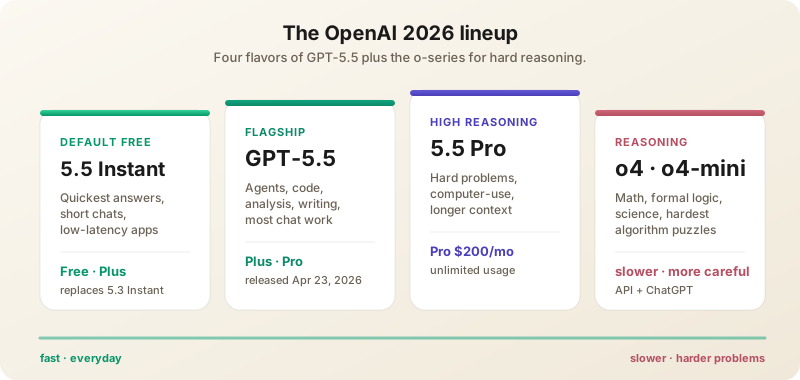
- GPT-5.5 — Released April 23, 2026. OpenAI's "smartest and most intuitive" general-purpose model. Strong gains in agentic coding, computer use, knowledge work, and early scientific research. Outperforms Gemini 3.1 Pro and Claude Opus 4.5 on most benchmarks; trades wins with Opus 4.7 depending on task. Markedly more efficient than GPT-5.3 — fewer tokens per equivalent output.
- GPT-5.5 Pro — Higher-reasoning variant for hard problems. Slower, costlier, much more careful. Available to Pro, Business, and Enterprise tiers. Use it when wrong answers are expensive.
- GPT-5.5 mini — Lightweight, fast, cheap. Good for high-volume simple tasks: classification, extraction, short-form generation.
- GPT-5.5 Instant — Rolling out from May 14, 2026 as the default for free and Plus users, replacing GPT-5.3 Instant. Quicker than full 5.5 for short interactions; better than 5.3 Instant on instruction following.
- GPT-5.3 — Previous generation, still available for cost-sensitive API use.
- o-series (o4, o4-mini) — Specialized reasoning models. Slower but excellent for math, formal logic, scientific reasoning, and competitive coding.
- GPT-Realtime-2, Realtime-Translate, Realtime-Whisper — Voice and audio family. GPT-5 reasoning piped into real-time voice apps, live translation across 70+ input languages, and streaming speech-to-text.
Plans (May 2026)
- Free — Limited GPT-5.5 Instant access with daily caps. Reverts to a smaller fallback after limit. Enough to try, not enough for daily work.
- Plus ($20/month) — Generous GPT-5.5 limits, native image generation, custom GPTs, browsing, file uploads, Advanced Voice. The default subscription for individual professionals.
- Pro ($200/month) — Unlimited GPT-5.5 + GPT-5.5 Pro, computer-use agent, priority access, longer context windows, more concurrent tasks. For power users and small businesses.
- Business ($30/user/month) — Team admin, SSO, data not used for training, shared GPTs, central billing.
- Enterprise — Custom contracts, advanced security, audit logs, dedicated capacity, custom data retention, MSA terms.
- EDU — Discounted Plus for verified students and educators.
What Made GPT-5.5 Different
Truly Agentic Workflow Execution
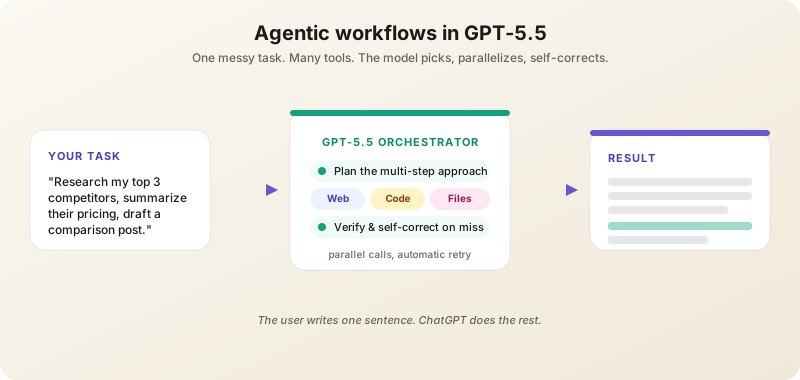
This is the headline feature. Give GPT-5.5 a messy, multi-part task and it plans, uses tools, checks its own work, navigates ambiguity, and keeps going.
Examples that work today on Plus and above:
- "Research my top 3 competitors, summarize their pricing pages, and draft a comparison blog post."
- "Analyze this CSV, identify anomalies, and create a presentation explaining them."
- "Find the best laptops under $1,500 for video editing, compile reviews from the last 6 months, and recommend one with reasoning."
- "Book me a haircut on Tuesday afternoon near the office and confirm by email."
The model can use Web, Python (Advanced Data Analysis), file uploads, image generation, and — on Pro — direct computer control to complete these. Behind the scenes it picks tools, calls them in parallel where possible, and self-corrects when a step fails.
Computer Use (Pro Tier)
GPT-5.5 can navigate desktop and web applications. It clicks, types, scrolls, fills forms — accomplishing tasks that previously required manual work. Common uses: data entry across legacy systems, scraping a stubborn portal, completing repetitive expense reports, end-to-end booking flows. The agent shows you what it's doing in a side panel and pauses for confirmation on consequential actions.
Better Code Execution
The Code Interpreter (now called "Advanced Data Analysis") is dramatically better at multi-file projects, debugging, and producing clean, well-tested output. It can install packages, manage virtual environments, and stream long-running jobs.
Stronger Scientific Reasoning
OpenAI specifically trained GPT-5.5 for early scientific research workflows. Literature review, hypothesis generation, and experimental design get much better results than earlier generations. Researchers in chemistry, biology, and physics have published case studies of GPT-5.5 catching subtle errors in pre-prints and proposing valid follow-up experiments.
Core Features in Depth
Image Generation (Native GPT Image)
ChatGPT can generate images conversationally. Specify what you want, then refine: "make her smile bigger", "change the lighting to sunset", "add a cat on the windowsill". Image generation has been deeply integrated — no separate model selector needed. Features that matter:
- Text rendering — Legible text inside images, including UI mockups, posters, and infographics.
- Editing & inpainting — Upload an image and ask ChatGPT to mask and modify a region. Replace a sky, remove a person, recolor a product.
- Style consistency — Reference a previous image in the conversation to keep characters, palettes, and aesthetics aligned across a series.
- Aspect ratios & sizes — Specify "vertical 9:16", "square 1024", or "wide 2048" to control output for downstream use.
Custom GPTs
Plus+ users can create specialized ChatGPTs preloaded with instructions, knowledge files, and tools. The GPT Store has thousands of community creations. Configuration is no-code: name it, describe its job, upload reference files, select which tools (browsing, code, image gen, custom actions) it can use.
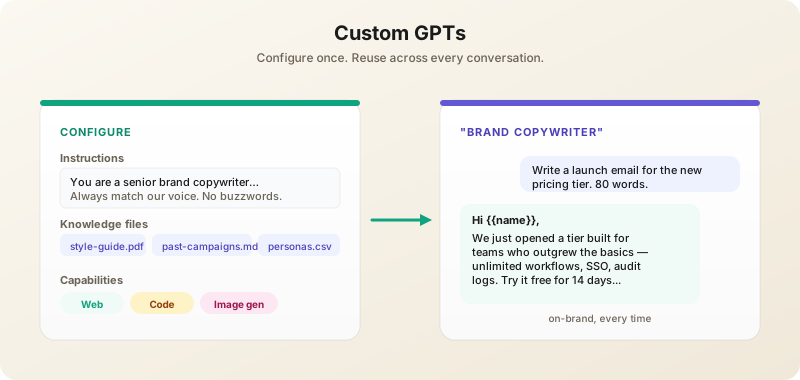
Examples that pay off in days:
- A writing coach that enforces your style guide.
- A coding assistant trained on your codebase docs and API conventions.
- A customer service agent built on your help center content.
- A onboarding buddy that answers new-hire HR questions from your handbook.
If you find yourself writing the same kind of prompt 10+ times, build a GPT.
Web Browsing
ChatGPT searches the live web, cites sources, and synthesizes findings. Particularly strong for current events, prices, recent research, and product comparisons. Set the model to "Browse" or just ask a recency-flavored question ("what's the latest on…") and it picks the right tool.
File Uploads
PDFs, Word docs, spreadsheets, images, code files, JSON, CSV. Upload and ask specific questions: "What are the three biggest financial risks in this 10-K?" "Find every column with PII and propose a hashing strategy." Up to ~512MB per file on Plus, more on Pro.
Voice Mode
Standard Voice (works on free) and Advanced Voice (Plus+) — natural conversations with low latency. Advanced Voice can now sing, switch tones mid-sentence, and even imitate accents. It also handles long uninterrupted listening — paste an article and ask it to read aloud, or have it dictate notes back to you. With GPT-Realtime-Translate, ChatGPT can simultaneously interpret between 70+ input languages and 13 output languages while keeping the speaker's pace.
Memory
ChatGPT can remember context across conversations. By default it remembers facts you tell it about yourself ("I'm a senior engineer focused on Postgres performance"). You can view, edit, or delete memories in Settings → Personalization → Memory. Memory is per-user and not shared across devices/accounts.
Canvas
A side-panel writing/coding workspace that opens when ChatGPT generates long content. Edit inline, ask for targeted revisions ("rewrite this paragraph more confidently"), and see version history. Replaces the awkward chat-and-copy loop for long-form work.
Effective Prompting in 2026
Treat It Like a Capable Junior Employee
GPT-5.5 is now smart enough that overspecified prompts hurt. Don't manage every step. State the goal, the constraints, and the audience — let the model figure out the path. Save micromanagement for cases where it's failing.
Specify What "Good" Looks Like
"Write a sales email" gets generic output. "Write a sales email for a B2B SaaS targeting CFOs at mid-market manufacturing companies. Goal: book a demo. Constraint: under 150 words. Tone: confident but not pushy. Don't use 'revolutionary' or 'game-changing'." → usable draft.
Use Custom Instructions
Settings → Personalization → Custom Instructions. Tell ChatGPT once who you are, what you do, and how you like answers — applies to every chat:
I'm a senior software engineer focused on TypeScript/React.
I prefer concise answers with code examples.
Skip basics unless I ask. Don't pad with disclaimers.
Use markdown for structure.
This single setting changes every interaction. Five minutes to set up; pays back for years.
Iterate, Don't Reprompt
"Make it shorter", "More technical", "Less corporate", "Add an example with code" — all faster than starting fresh. ChatGPT's conversation memory is strong; use it.
For Hard Problems, Switch Models
Math/science → o-series. Code review → GPT-5.5. Quick questions → GPT-5.5 mini. Most tabs in ChatGPT now have a model selector — pick deliberately.
For Repetitive Tasks, Build a GPT
Anything you'll do more than 10 times — log triage, vocab cards, weekly status reports — deserves its own custom GPT with locked-in instructions.
The OpenAI API
For builders, the API exposes everything ChatGPT can do plus more. Endpoint: https://api.openai.com/v1/responses (the modern unified endpoint) or chat/completions for legacy code.
Key API Capabilities
- Responses API — One endpoint for chat, tools, browsing, file search, image generation, and code interpreter.
- Tool use — JSON-schema-defined functions; supports parallel and forced tool calls.
- Structured outputs — Guarantees JSON conformance to a schema. Use this instead of "please return JSON" in the prompt.
- Batch API — 50% off list pricing for async jobs that can wait up to 24h. Great for backfills and evals.
- Fine-tuning — Available for GPT-5.5 mini and o-series; useful when you have thousands of high-quality examples and a narrow domain.
- Assistants & Threads — Higher-level abstractions for building agents with persistent context, file search, and code execution.
The Codex CLI
OpenAI's answer to Claude Code. The Codex CLI runs in your terminal, edits your repo, and uses GPT-5.5 (or any selected model) as its brain. Install with npm install -g @openai/codex. Many teams now run both Codex and Claude Code side-by-side, picking per task.
Real-World Workflows by Role
For Marketers
- Campaign drafting — Custom GPT loaded with brand guidelines, recent campaigns, and the target persona. Daily use produces on-brand copy in seconds.
- Competitor analysis — Agent mode with a research prompt; ChatGPT browses, summarizes, and outputs a Markdown comparison table.
- Image generation for socials — Native image gen is fast enough for daily content; iterate in chat until the visual works.
For Operators & Analysts
- CSV/Excel analysis — Upload spreadsheet, ask for trends, outliers, and a chart. Advanced Data Analysis handles ~100MB files cleanly.
- Process automation — Pro tier computer-use agent fills out repetitive web forms, books vendors, scrapes lists.
- Status reports — Custom GPT that ingests this week's metrics and produces a 2-paragraph executive update in your house style.
For Developers
- Codex CLI for repo work — Multi-file refactors, test generation, migrations.
- API for product features — RAG, classification, customer chat — Responses API with structured outputs covers 80% of needs.
- o-series for hard problems — Algorithm design, formal verification, complex SQL. Slower but worth it.
For Students & Researchers
- Study mode — Upload course notes and exam past papers; ChatGPT generates practice questions and tutors you through wrong answers.
- Literature surveys — Upload PDFs, ask for syntheses with citations. Verify before trusting; hallucinations on cited claims still happen.
- Voice study sessions — Advanced Voice can quiz you while you walk.
ChatGPT vs Claude vs Gemini (May 2026)
All three are excellent. Choose based on workflow:
- ChatGPT — Best for: image generation, agentic computer use, voice mode, broadest plugin/GPT ecosystem, mainstream brand recognition.
- Claude — Best for: nuanced writing, code review, careful analysis, anything where "I'm not sure" beats hallucination, Claude Code for agentic coding.
- Gemini — Best for: Google Workspace users, video/audio analysis, 1M-token context (matched only by Claude Opus 4.7).
Most professionals end up subscribing to two of the three. Many use ChatGPT for image gen and voice, Claude for writing and code, Gemini for Workspace docs.
Privacy & Data Controls
By default, free and Plus conversations may be used to improve OpenAI models. Disable in Settings → Data Controls → Improve the model for everyone. Business, Enterprise, and API requests are not used for training by default. Temporary Chat mode (the icon in the top-right) keeps a conversation out of history and memory entirely — useful for sensitive content.
Common Mistakes to Avoid
- Using free tier for serious work — Plus at $20/month is dramatically more capable. Worth it within a single useful session.
- Not using files — Pasting long text into chat is worse than uploading the file. Files get better attention and retrieval.
- Ignoring Custom Instructions — Spend 5 minutes setting them up. Pays back forever.
- Trusting outputs blindly — Always verify factual claims, citations, and numbers. ChatGPT still hallucinates, just less than before.
- Not using GPTs for repeat tasks — If you do the same kind of prompt 10+ times, build a custom GPT.
- Defaulting to the most expensive model — GPT-5.5 mini and GPT-5.5 Instant handle most everyday tasks at a fraction of the cost.
- Confusing Memory with Custom Instructions — Memory is automatic facts the model picks up. Custom Instructions are rules you set explicitly. Both useful, different purposes.
What's Next
OpenAI's signaled roadmap for late 2026: an integrated ChatGPT Ads Manager (already rolling out to U.S. businesses with CPC bidding), the $4B deployment company spun out with TPG to embed engineers in Fortune 500 rollouts, deeper computer-use across mobile platforms, and a long-rumored consumer device. The product surface will keep expanding — but the core skills (specific prompts, model selection, file workflows, custom GPTs) carry forward.