What is Claude in 2026?
Claude is Anthropic's AI assistant — and as of May 2026 it has become the model most professional software engineers, writers, and analysts reach for first. The lineup is fast-moving: the flagship is Claude Opus 4.7 (released April 16, 2026), with Sonnet 4.8 expected within weeks (Anthropic typically ships Sonnet 2-4 weeks after Opus). Anthropic crossed a $30 billion annualized revenue run rate in early 2026, briefly pulling ahead of OpenAI on enterprise spend — driven almost entirely by developers and large companies running Claude in production.
Claude's brand is built on three traits that competitors have struggled to match. It writes carefully. It thinks under uncertainty rather than confabulating. And it has the most capable agentic coding stack on the market, exposed through Claude Code (CLI + desktop), the Claude API, and the Claude Code SDK. This guide is your end-to-end map: every product surface, every model, the pricing math, the prompt patterns that work, and the pitfalls that catch newcomers.
The 2026 Model Lineup
Anthropic ships three model tiers — Opus, Sonnet, Haiku — at roughly the same cadence. Pick by task, not by reflex.
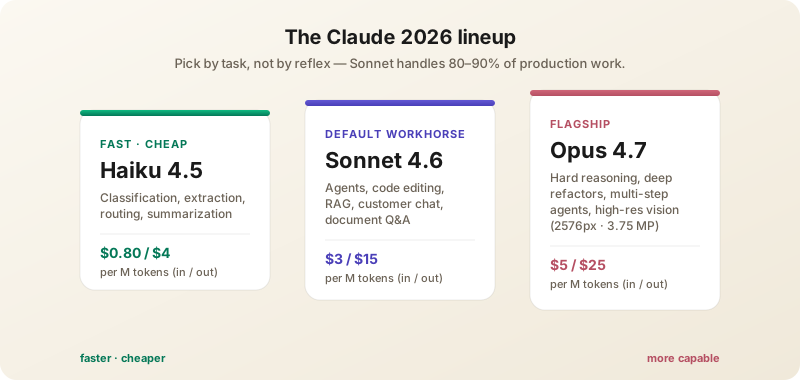
- Claude Opus 4.7 — The most capable model. First Claude with high-resolution vision (2576px / 3.75MP, up from 1568px on 4.6). 1M token context window, 128K max output tokens. Excellent at long-horizon reasoning, multi-step agentic work, hard code review, and nuanced writing. Pricing: $5/M input, $25/M output. Uses ~1-1.35x more tokens than 4.6 thanks to a retrained tokenizer — factor this into cost models.
- Claude Sonnet 4.6 — Released February 17, 2026. The first Sonnet to beat the previous-generation Opus on coding benchmarks. The recommended default for most production work: 80-90% of Opus quality at 60% the cost. $3/M input, $15/M output.
- Claude Sonnet 4.8 — Expected May 2026. Anthropic skipped 4.7 for Sonnet per leaked changelog references. Pricing likely unchanged from 4.6 at $3/M input, $15/M output. Expected improvements: vision parity with Opus 4.7, better tool-use reliability, longer effective context.
- Claude Haiku 4.5 — Released October 2025, still the workhorse for high-volume, latency-sensitive applications. $0.80/M input, $4/M output. Punches well above its weight for classification, structured extraction, simple tool calls, and summarization at scale.
Choosing the Right Model
The biggest single optimization most teams haven't made: stop defaulting to Opus for everything. A rough decision tree:
- Use Haiku 4.5 for: classification, extraction, routing, "is this safe?" filters, single-shot summarization, anything you'll do millions of times.
- Use Sonnet 4.6/4.8 for: 90% of agent work, code editing, writing assistance, document Q&A, multi-turn customer chats, RAG over your knowledge base.
- Use Opus 4.7 for: complex multi-file refactors, deep architectural design, long-horizon agent loops where mistakes compound, high-stakes legal/medical/financial analysis, hardest reasoning problems.
If you're not sure, start with Sonnet. You'll know to escalate to Opus when Sonnet keeps making the same class of mistake.
Claude Code: The Terminal CLI
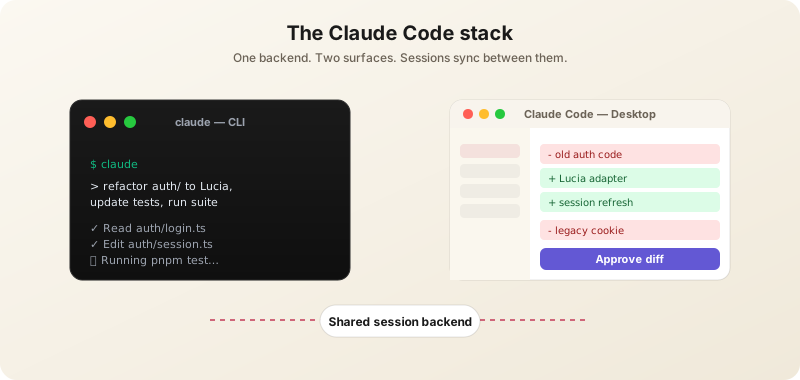
Claude Code is Anthropic's official AI coding tool. The CLI version is the most powerful surface — it lives where developers already work and treats your terminal, filesystem, and tools as first-class environment.
Installing the CLI
npm install -g @anthropic-ai/claude-codeOr via Homebrew on macOS: brew install --cask claude-code. On Windows, install inside WSL2 (native Windows support is in beta as of May 2026). Requires Node.js 18+ and an Anthropic account on the Pro ($20/mo), Max ($100-200/mo), Team, or Enterprise plan. The Free tier of claude.ai does not include Claude Code.
First Run
cd /your/project
claude
Claude Code reads your repo, indexes it semantically, and presents an interactive prompt. Ask questions, request changes, or hand off entire tasks. It edits files, runs commands, runs your test suite, and iterates until done. The first time you ask it to run a tool (Bash, Edit, Write) it asks for permission — answer "Always allow for this project" once and it remembers.
The Tools Claude Code Uses
- Read / Glob / Grep — Reads files and searches your codebase semantically.
- Edit / Write / MultiEdit — Modifies files. Edit is preferred for surgical changes.
- Bash — Runs shell commands. Used for tests, builds, git, package managers.
- WebFetch / WebSearch — Browses the web for documentation, error messages, or recent changes.
- Task — Spawns a subagent for parallel work (e.g., "investigate this bug while I'm reading the design doc").
- TodoWrite — Tracks long-task progress; you see a checklist update live in the terminal.
Power Features
- Sub-agents — Spawn specialized agents for parallel tasks (test runner + code reviewer simultaneously).
- Plugins — Extensible via npm packages and MCP servers (databases, browsers, internal APIs).
- Project memory — Drop a
CLAUDE.mdin your repo root. Claude reads it every session — put your conventions, glossary, and constraints there. - Permissions — Granular control over which tools Claude can call without asking. Configure per-project in
.claude/settings.json. - Session resume — Long-running sessions persist via
claude --resume. Useful for handing the same task across days. - Hooks — Run shell commands on tool events: format on every Edit, run typecheck after a session ends, post to Slack when a task completes.
- Slash commands — Define reusable workflows as
.claude/commands/<name>.mdfiles. Type/reviewand Claude runs a code review with the steps you wrote.
CLAUDE.md: Your Repo's Brain
The single highest-leverage thing you can add to a Claude Code project. A good CLAUDE.md covers:
- Stack and conventions ("This is a Next.js 16 + Prisma project; we use Tailwind for styling, no CSS modules.")
- What to never do ("Never run database migrations against production without asking. Never push to main.")
- Test commands ("Run
pnpm testfor unit tests,pnpm e2efor Playwright.") - Glossary ("'Article' is news. 'Guide' is evergreen content. 'Tool' is a directory entry.")
- Pointers to deeper docs ("See
docs/architecture.mdfor system design.")
Claude Code: The Desktop App
On April 14, 2026, Anthropic released a complete redesign of the Claude Code desktop app for Mac and Windows. It now offers full parity with the CLI while adding visual workflow tools the terminal can't.
Installation & First Steps
Download from claude.com/download, install like any other desktop app, and sign in. The "Code" tab appears for Pro, Max, Team, and Enterprise users. Existing CLI sessions show up in the sidebar within seconds.
Key Desktop Features
- Sidebar with multi-session management — every active and recent session at a glance, filterable by status, project, and environment, groupable by project.
- Drag-and-drop workspace layout — arrange chat, file editor, terminal, and preview panels however you want; layouts persist per project.
- Integrated terminal — run tests, builds, scripts without leaving the app.
- In-app file editor — make spot edits without switching to your IDE.
- Rebuilt diff viewer — handles 10K+ line changesets cleanly with collapse and side-by-side modes.
- Expanded preview pane — preview HTML, PDFs, and local app servers (e.g.
localhost:3000) inline. - Three view modes — Verbose (see every tool call), Normal (default), Summary (just results).
- Plugin parity with CLI — your CLI plugins work identically.
- SSH support on Mac and Linux — point sessions at remote machines without re-installing Claude on the server.
When to Use Each
- CLI — pure terminal workflows, scripting, headless servers, CI/CD pipelines, Vim/Neovim users, anything that should be automatable.
- Desktop App — managing 3+ parallel sessions, visual diff review, mixed terminal + file editing in one place, screen-recording demos for teammates.
Most professionals use both — desktop for active work, CLI for one-off automation and CI. Both share the same backend, so sessions you start in one show up in the other.
Claude.ai (Web)
The classic chat interface at claude.ai. Best for non-coding tasks: writing, analysis, research, document review.
Plans (May 2026)
- Free — Limited daily Sonnet usage. Good for trying it out; not enough for serious work.
- Pro ($20/mo) — Sonnet 4.6 + Opus 4.7 with much higher limits, Projects, file uploads, Artifacts.
- Max ($100-200/mo) — 5-20x Pro limits depending on tier, includes Claude Code access, priority capacity during peak hours.
- Team ($30/user/mo) — Org admin, shared Projects, billing controls.
- Enterprise — SSO, audit logs, custom data residency, dedicated capacity.
Projects
A Project is a persistent workspace with custom instructions and uploaded knowledge. Use one per domain — "Q3 Marketing", "Customer Research", "Personal Blog". Files you upload (PDFs, codebases, transcripts) stay attached, and Claude uses them across every conversation in that Project.
Artifacts
When Claude generates code, documents, diagrams, or interactive React components, they appear in a side panel called Artifacts. You can edit them inline, fork variations, and (for code) actually run small apps right in the browser. Great for prototyping; not a replacement for a real IDE.
Skills: Drop-in Capabilities
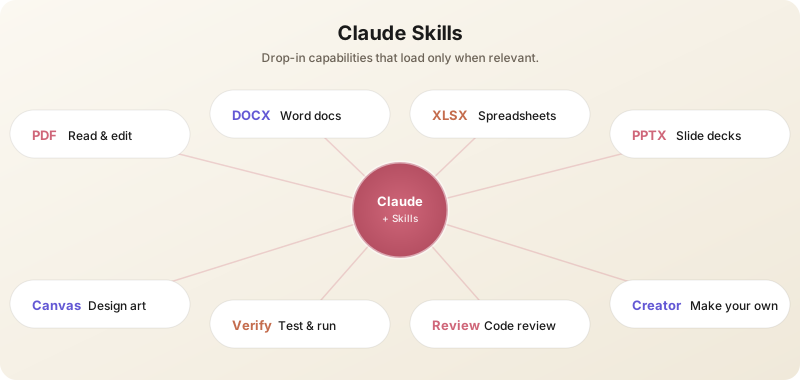
Skills are one of the most useful additions of 2026. A Skill is a small package — a prompt, optional code, and metadata — that teaches Claude how to do a specific task well. The key idea is progressive disclosure: Claude only loads a skill when a request actually matches it, so your context window stays clean.
What's in the Box
Anthropic ships a growing set of first-party skills with Claude.ai and Claude Code. The ones most people use weekly:
- pdf — Read, edit, fill, merge, split, rotate, watermark, OCR. Hand Claude a PDF and ask for any of these; no extra plumbing needed.
- docx — Build polished Word documents: reports, memos, letters, templates, with headings, tables of contents, page numbers, tracked changes.
- xlsx — Open, clean, transform, and create spreadsheets. Excellent for messy CSVs that need to become real analysis-ready files.
- pptx — Generate or edit slide decks. Triggers on any mention of "deck", "slides", or a .pptx file.
- canvas-design — Create original visual art (.png and .pdf posters, covers, infographics) using a built-in design philosophy. Pairs well with the pdf and pptx skills.
- skill-creator — A meta-skill that helps you author, test, and benchmark your own skills.
Skills in Claude Code
In Claude Code, skills surface as Skill tool calls. They live alongside built-in tools like Read and Edit but are loaded lazily. You'll see them show up as anthropic-skills:pdf, anthropic-skills:xlsx, and so on. Some are user-invocable via slash commands like /verify, /code-review, or /security-review.
Building Your Own Skill
Skills are folders containing a SKILL.md (the spec) and optional supporting files. Use the skill-creator skill to bootstrap one. Common reasons teams write skills:
- Enforce a house style guide on every written output.
- Run a standard release-checklist workflow before tagging.
- Normalize incident-report formatting from messy Slack threads.
- Generate compliance-ready exports from a database schema.
If you find yourself pasting the same instructions into Claude every week, that's a skill waiting to be written.
Connectors: Plug Claude Into Your Tools
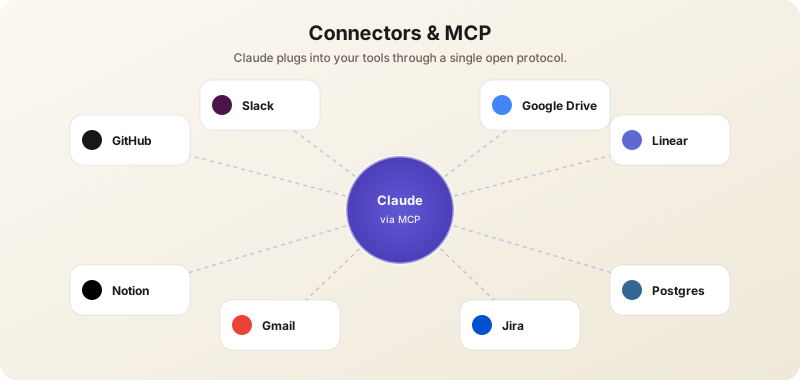
Connectors are managed integrations between Claude and external services — GitHub, Gmail, Slack, Linear, Google Drive, Notion, Jira, Postgres, and more. Underneath, most of them speak MCP (Model Context Protocol), the open standard Anthropic introduced in late 2024 and that the rest of the industry adopted in 2026.
Connectors vs MCP
The distinction is mostly about who runs the server. Connectors are first-party, managed by Anthropic and partners — one-click install in Claude.ai Settings → Connectors, OAuth handled for you. MCP servers are the raw underlying protocol; anyone can write one, and the community has built hundreds. If a tool you care about doesn't have an official connector yet, there's almost certainly an MCP server for it.
Setting One Up
- In Claude.ai, open Settings → Connectors. Browse the directory.
- Click "Connect" on the service you want (GitHub, Linear, Drive, etc.). Authenticate with OAuth.
- Pick the scope — for example, which Drive folders Claude can read. Defaults are conservative.
- Start a new chat. Claude now has tools like
github__list_issuesordrive__search_filesavailable; it picks them up automatically when your question needs them.
In Claude Code, MCP servers are configured via .claude/settings.json or via the claude mcp add command. The Claude Code documentation covers the schema.
What People Actually Build With Them
- "Catch me up on Linear" — Claude reads your assigned issues, summarizes status, drafts updates.
- "Triage the inbox" — Gmail connector + a rule sheet → labeled drafts ready for one-click send.
- "Investigate this incident" — Postgres + GitHub + Slack connectors → Claude correlates a spike in error logs to a recent deploy and a customer-reported bug.
- "Write the weekly engineering update" — GitHub + Linear + Slack → a single Markdown summary, drafted to Notion.
Routines: Scheduled Claude Agents
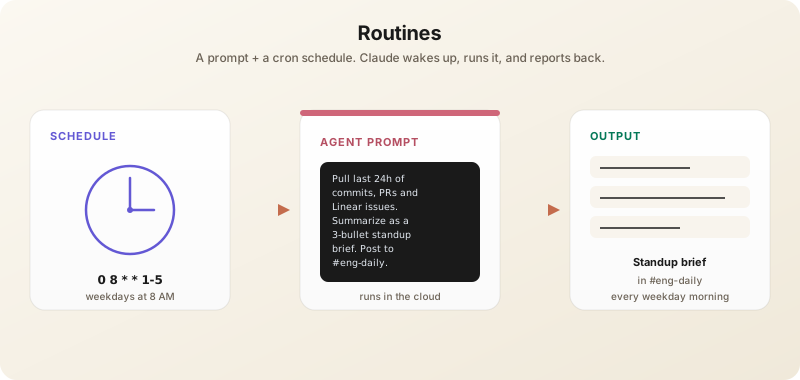
A Routine is a Claude agent on a cron schedule. You write a prompt, pick a cadence, and Anthropic runs it for you in the cloud — no laptop required, no babysitting. Routines turn "I should do this every Monday" into "this happens every Monday".
What a Routine Looks Like
- Schedule — A cron expression or a friendly preset ("every weekday at 8 AM", "every Sunday night", "once an hour").
- Prompt — The task. Phrase it like you would to a human assistant: clear goal, source of truth, output format.
- Tools — Optional connectors the routine can use (GitHub, Gmail, Drive, etc.).
- Output — Where the result goes. A chat thread you can read back later, an email, a Slack post, or a doc in Drive.
Setting Up a Routine
In Claude.ai, open the "Routines" section in the sidebar, click "New routine", paste your prompt, set the cadence, pick the destination, save. In Claude Code, the same thing is available via the schedule skill or the /schedule slash command — useful when the routine is part of a repo's workflow rather than a personal task.
High-Value Routines
- Daily standup brief — Pull last 24h of commits, PRs, and Linear issues; summarize as three bullets; post to Slack.
- Inbox digest — Every weekday at 8 AM, summarize new email threads with action items.
- Competitor watch — Weekly: check 5 competitor blogs and pricing pages, flag changes.
- Drift detector — Daily: diff your production schema against the repo, raise an issue if they disagree.
- Newsletter prep — Sunday night: skim the week's saved links and draft a Monday newsletter.
Routines aren't an "always-on" agent — they wake up, do their job, and stop. That's a feature: bounded scope is what makes them safe enough to leave running.
The Claude API
For builders, the Claude API is the foundation of everything Anthropic ships. SDKs in Python, TypeScript, Java, and Go. Endpoint: https://api.anthropic.com/v1/messages.
The Smallest Useful Request
curl https://api.anthropic.com/v1/messages \
  -H "x-api-key: $ANTHROPIC_API_KEY" \
  -H "anthropic-version: 2023-06-01" \
  -H "content-type: application/json" \
  -d '{
    "model": "claude-opus-4-7",
    "max_tokens": 1024,
    "messages": [{"role": "user", "content": "Hello, Claude"}]
  }'
Prompt Caching: The Single Biggest Cost Win
If your app has a stable system prompt, RAG context, or tool definitions, cache them. Prompt caching cuts costs by up to 90% on cached tokens (cached reads are 1/10th the price of normal input) and reduces latency by 60-80%. Add cache_control: { type: "ephemeral" } to blocks you want cached. Default 5-minute TTL; 1-hour TTL available on paid tiers. For any agent loop where the system prompt doesn't change, caching is the difference between a viable product and an expensive prototype.
Tool Use (Function Calling)
Pass tools in the request; Claude returns a tool_use block when it wants to call one. Your code executes the tool, returns the result as a tool_result, and the loop continues. This is the foundation of every agent. Claude 4.x can call multiple tools in parallel in a single response — don't artificially serialize them.
Extended Thinking
Opus 4.7 and Sonnet 4.6+ support extended thinking: explicitly ask the model to think before answering. Pass thinking: { type: "enabled", budget_tokens: 10000 }. The thinking output is returned in a separate block you can hide from end users. Use this for hard reasoning, math, planning — anywhere accuracy beats latency.
MCP: The Open Protocol
Model Context Protocol (MCP) is the open standard Anthropic created for letting AI clients (Claude Desktop, Claude Code, Cursor, Zed, and others) talk to external tools and data sources. An MCP server exposes resources (files/data), tools (functions), and prompts. Claude calls them through a uniform interface.
By 2026 there are MCP servers for Linear, Slack, GitHub, Snowflake, Postgres, Stripe, Notion, Jira, and dozens of internal stacks. If you're building an integration for Claude, write an MCP server rather than a custom tool block — your users can plug it into every MCP-aware client (including Gemini and OpenAI's, which both adopted MCP in early 2026) without you writing each integration.
Prompt Engineering for Claude
Be Specific About Output Format
Vague prompts get vague output. Compare:
- "Write about AI" → generic mush.
- "Write a 600-word blog post for non-technical readers explaining how transformers work, using a postal-service analogy. Tone: friendly. End with a 3-bullet summary." → usable draft.
Use XML Tags to Structure Long Prompts
Claude was trained to read XML-like tags. When you have long inputs and instructions, wrap them:
<document>
{{the user's contract}}
</document>

<task>
Identify all clauses that conflict with EU GDPR. Output as a numbered list.
</task>
This is far more reliable than relying on prose like "the document is above, the task is below."
Few-Shot Examples
For consistent format on repetitive tasks, give 2-5 examples in your prompt. Claude will follow the pattern exactly. Especially helpful when you want a specific tone or JSON shape.
Use Projects (claude.ai) or CLAUDE.md (Claude Code)
Both let you set persistent context. Upload your style guide, codebase docs, or domain knowledge once, and Claude uses it across every conversation. The setup is 10 minutes; the payoff compounds.
Leverage the 1M Context
Drop entire books, codebases, or research papers in. Then ask specific questions: "Across these 50 customer interviews, what are the top 5 product complaints? Cite the interview number and a quote." Vague questions against huge contexts get vague answers.
Iterate, Don't Restart
Claude maintains conversation context. Refining is faster than starting over: "Make the second paragraph more concrete", "Rewrite this in a more confident tone", "Add a counterargument to point 3".
Use Vision Strategically
Opus 4.7's high-res vision (2576px) reads UI screenshots, charts, and document scans far better than 4.6. Paste a Figma design and ask for the React code. Drop a research paper PDF and ask for a critique with citations. Photograph a whiteboard and ask for a clean digital transcription.
Real-World Workflows
For Software Engineers
- Test-driven refactors — Open Claude Code in the repo, ask it to "refactor the auth module to use Lucia, update tests, run the full suite, fix any regressions." Walk away; come back to a green PR.
- Code review — Paste a diff into claude.ai with "Review this PR. Look for bugs, missing edge cases, and style violations against our guide." Or set up a
/reviewslash command in Claude Code. - Migration projects — Things like "Rewrite all class components as hooks across
src/" are now one-shot tasks for Claude Code with an MCP server pointed at your repo.
For Writers & Marketers
- Style-locked drafting — Project with your style guide + 10 sample articles → drafts that already sound like you.
- Voice-of-customer mining — Drop a quarter of support transcripts into a Project; ask for the top 10 friction points with quotes.
- Long-form editing — Paste an 8K-word essay; ask Claude to "tighten this by 20% without losing argument." Often beats the work of a human editor for first-pass cuts.
For Researchers & Analysts
- Literature surveys — Feed 30 papers; ask for a synthesis matrix of findings, sample sizes, and methodologies.
- Data cleanup — Drop a messy CSV; ask Claude to write the Python that normalizes it, then iterate on column rules.
- Briefing generation — A Project per topic, fed with primary sources; ask weekly for an updated 1-page brief.
Claude vs GPT-5.5 vs Gemini 3.1 Pro
Claude wins on: nuanced writing, careful reasoning under uncertainty, code review and refactoring, agentic coding (Claude Code is the best tool of its kind), willingness to say "I don't know" rather than hallucinate.
GPT-5.5 wins on: agentic computer use, multi-tool orchestration with the broadest plugin ecosystem, raw benchmark scores on a few specific tests, native image generation, voice mode.
Gemini 3.1 Pro wins on: Google Workspace integration (no contest), real-time Search grounding, native video and audio analysis, and the largest free-tier in the industry.
The honest answer: if you're a developer, Claude is the default. If you live in Google Workspace, Gemini. If you need agentic computer use or image generation in chat, ChatGPT. Most professionals subscribe to at least two of the three.
Privacy & Data Use
By default, Anthropic does not train on data submitted via the API, Claude Code, or paid claude.ai plans. Free-tier claude.ai conversations may be used for training unless you opt out in Settings → Privacy. Enterprise customers get explicit zero-retention agreements, custom data residency (US, EU, JP), and audit logging. Read the Privacy and Data Usage docs before processing PII or regulated data; defaults are good but configurable.
Common Pitfalls
- Token costs surprise you — Opus 4.7's new tokenizer can use up to 35% more tokens than 4.6 for the same prompt. Monitor usage on the API console and set spend alerts.
- Claude refuses something legitimate — Provide more context about your use case. Claude is more conservative than competitors but unblocks with explanation ("I'm a clinician asking about drug interactions for patient education").
- Long sessions degrade — Past ~200K tokens of conversation, start a new session and reload only the essential context. Quality drops slowly but steadily.
- You forgot to use Sonnet — Many people default to Opus. For 80-90% of tasks, Sonnet 4.6 is faster, cheaper, and good enough.
- You didn't enable prompt caching — Almost everyone leaves money on the table here. Cache your system prompts and tool definitions on day one.
- You wrote a custom tool when a Skill or Connector existed — Before building, check the Skills directory in Claude.ai and the connector list. Most "I need to integrate with X" turns out to be a one-click connector.
- Conflating Claude Code with claude.ai — Claude Code is the agentic coding tool; claude.ai is the chat product. Different surfaces, different superpowers. Use Claude Code for anything touching code or your filesystem.
What to Watch Next
Anthropic's near-term roadmap (telegraphed via Code with Claude 2026 keynote and engineering blog posts): native video understanding on Opus, streaming tool use (already in beta), background "dreaming" agents that work between user turns, longer extended-thinking budgets, an official Claude Code SDK for headless agent use, and tighter MCP-everywhere integration. Build on stable APIs, good caching habits, Skills, Connectors, and Routines — and you'll inherit those upgrades for free.